 ClubLadder
Ladders
A ladder is a ranking competition inside your club. Teams challenge each other, play matches, and move up or down the standings based on their results. This guide walks you through everything from joining a ladder to playing your first match.
Finding Ladders In Your Club
Open the club page and go to the Ladders tab. Every ladder in the club is listed here with its name and sport type. Click on a ladder to open it and see the current standings.
Joining A Ladder
To participate in a ladder you need a team. How you join depends on the sport type of the ladder.
Tennis (1 player per team)
Click Create Team on the ladder page and choose a name. Your team is active immediately and appears in the standings right away. You are ready to play.
Padel (2 players per team)
Click Create Team and choose a name. Your team starts in a pending state — it needs a second member before it becomes active. Share your team name with your partner and ask them to open the same ladder page and join your team. Once they join, the team becomes active automatically.
You can only be part of one team per ladder. You cannot join or create a second team if you are already in one.
The Ladder Page
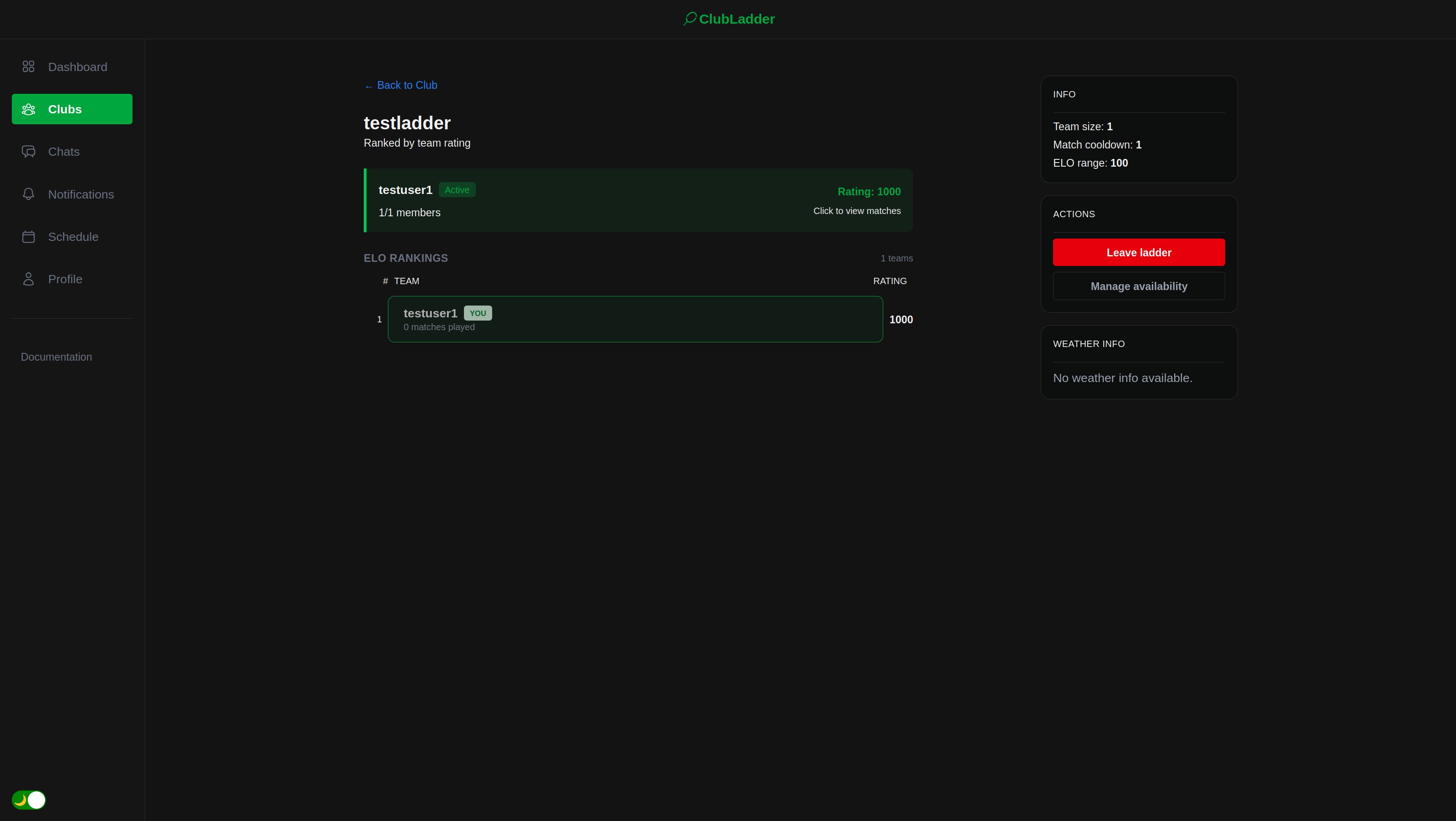
Once you are in a ladder, the ladder page shows:
- Standings — all active teams ranked by ELO rating from highest to lowest, with each team's current rating and win/loss record.
- My Team — a card showing your own team's current rating, rank, and status. From here you can also manage your team's availability.
Setting Your Availability
Before matches can be scheduled for your team, you need to set when you are available to play. Open your team page and go to the Availability tab. Select the time slots that work for you. The matchmaking system uses this information when proposing matches, so keep it up to date.
Getting Matched
Once your team is active and has availability set, the system schedules matches automatically. You do not need to do anything to trigger this. Matches are proposed based on:
- ELO range — you will only be matched against teams within a set rating range of your team. Very lopsided matchups are avoided.
- Match cooldown — the ladder has a cooldown setting that determines how many matches against other opponents must be played before you can face the same team again.
When a match is proposed to you, you and your team members receive a notification. You can accept or decline the proposal. If all players accept, the match is planned and appears in your schedule.
Playing And Reporting A Match
After completing a match, one team submits the result. Go to the match in your schedule and enter the score and winner. The other team is notified and can confirm or dispute the result.
- If they confirm, the match is finalised and both teams' ELO ratings update.
- If they dispute, a club admin reviews and decides the outcome.
- If the other team does not respond before the deadline, the result is finalised automatically.
See the Planning Matches guide for full details on the schedule and match lifecycle.
Creating A Ladder (Admins Only)
Club admins can create new ladders from the Ladders tab on the club page. Click Create Ladder and fill in the form:
| Field | Description | |---|---| | Name | Must be unique within the club | | Sport | Determines team size: Tennis (1 player) or Padel (2 players) | | ELO range | Maximum rating difference allowed between matched opponents | | Match cooldown | Matches against other teams required before a rematch is allowed |
Once created, the ladder is immediately visible to all club members and open for teams to join.
Admins can also edit ladder settings or delete a ladder from the ladder page. Note that the sport type cannot be changed once teams are participating.